
Whatnot: Shop, Sell, Connect
Whatnot Inc.Shopping
4.723.52K Reviews
- Version
- Varies With Device
- Installs
- 10.00M
- Age Rating
- Mature 17+
Screenshots

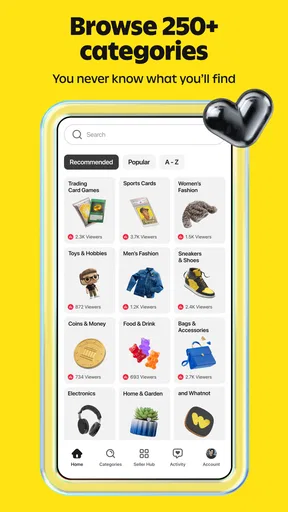



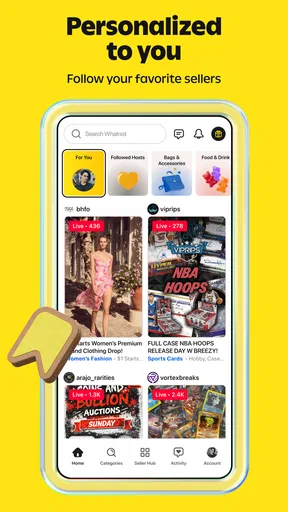
Our Review of Whatnot: Shop, Sell, Connect
 Analysis by Appyee
I approached Whatnot: Shop, Sell, Connect as someone curious about live shopping but not especially interested in turning every purchase into a social event. After spending time with it, my impression is clear: this is a shopping app built around live video, fast interaction, and communities gathered around particular kinds of products. It feels closer to joining an ongoing event than browsing a quiet online catalog.
That difference matters from the first minute. You are not simply searching for an item, comparing a few static product photos, and checking out. You are entering a marketplace where sellers present products live, viewers react in real time, and the atmosphere can encourage quick decisions. I found that energy appealing when I already knew what I wanted to explore, but it could also feel busy when I was only casually looking.
The app comes from Whatnot Inc. and is free to install. It is listed for mature users aged 17 and over, which fits the more interactive nature of its marketplace and the need to make purchasing decisions carefully. The service has been available since December 6, 2019, and its scale is easy to notice: it has passed ten million installs, with an average rating of 4.7 from around 310 thousand ratings and roughly 22 thousand written reviews.
What the first visit feels like
The most useful way to understand Whatnot is to forget the usual online-store routine for a moment. Instead of beginning with a long list of products, I would begin by thinking about the kind of community or product area I want to follow. The live format works best when the subject itself interests you, whether you are browsing collectibles, fashion, electronics, cards, or another area represented by the marketplace.
Once inside, the app can feel more like a stream of events than a shelf of merchandise. Sellers are not only displaying items; they are explaining them, responding to questions, and creating a sense of occasion around each sale. That human element is the main reason to use this app instead of a conventional shopping platform.
For a first-time user, I recommend resisting the temptation to buy immediately. Spend a few minutes observing how a live session moves. Notice how the seller describes condition, how viewers ask questions, and how quickly an item can move from discussion to purchase. This short period of watching is valuable because it teaches you the rhythm without costing anything.
The strongest part of Whatnot is the combination of discovery and conversation. A static listing can show you an object, but a live presentation may reveal why a seller thinks it is interesting, what details deserve attention, or how it compares with similar items. That context can be especially useful for products where condition, authenticity, size, edition, or small visual differences matter.
At the same time, the live format is not automatically better than ordinary shopping. If I need a specific replacement cable, a standard household item, or the lowest possible price after careful comparison, I would usually choose a traditional marketplace. Whatnot makes more sense when the process of discovering and discussing the item is part of the appeal.
Setting up without feeling rushed
My advice for setup is simple: create your account, look around, and personalize your experience gradually rather than trying to follow everything at once. The goal is not to fill the app with every possible interest. It is to make the first screen useful enough that you can recognize a worthwhile live session when it appears.
Think of your first setup as building a shortlist. Follow only the product areas and sellers that genuinely match your interests. A narrow starting point makes the app easier to understand and reduces the chance that the live feed becomes a stream of unrelated distractions. You can always broaden your interests later.
Before making a purchase, I would also make sure I understand the seller’s presentation and the item being offered. Live shopping rewards attention. Watch for details about condition, quantity, included accessories, sizing, or any visible flaw. If something is unclear, use the conversation rather than assuming the answer from a quick glance.
One practical habit is to keep a personal spending limit in mind before entering an exciting session. The app’s entertainment value can make a purchase feel like part of the show, especially when other viewers are reacting quickly. A limit gives you a useful pause: if the item is still attractive after considering its condition and total cost, you can proceed with more confidence.
Another helpful habit is to separate browsing sessions from buying sessions. On a quiet day, explore sellers and observe their style. When you are actively looking for something, enter with a clearer purpose. This distinction prevents the app from turning every moment of curiosity into an unplanned shopping trip.
Your first meaningful success
For me, a successful first action would not be winning a fast-moving sale. It would be finding a live session that matches a genuine interest, understanding how the seller presents products, and completing one purchase only when the item and terms feel clear. That is a more reliable introduction than treating the first visit like a race.
Start by choosing one area you already understand. Familiarity gives you a reference point. If you know what a particular collectible, garment, or device normally looks like, you are better positioned to judge the seller’s description and ask a useful question. Beginners often have a smoother experience when they begin with something recognizable instead of an unfamiliar category.
During the session, pay attention to how the seller handles questions. A useful seller makes relevant details easier to understand and does not leave the audience guessing about the item. You are not only evaluating the product; you are evaluating whether the live presentation gives you enough information to make a sensible decision.
A concrete everyday example would be someone looking for a gift connected to a hobby. On a conventional shopping site, that person might search broad terms and receive a large number of similar listings. In Whatnot, they can watch a live seller show several related items, explain their differences, and answer a question about which one suits a beginner. The meaningful success is not merely buying something; it is leaving with a better understanding of the choice.
If you decide to buy, slow down for the final review. Check that the item shown is the item you intend to purchase, reconsider the condition described during the stream, and make sure the purchase still fits your budget. The live environment can create urgency, but urgency is not proof that an item is right for you.
For sellers, the first meaningful success looks different. It is not simply listing an item. It is preparing a clear presentation, organizing products so they can be shown without confusion, and responding to viewers in a way that builds trust. Whatnot is more demanding than posting a photograph because the seller has to communicate in the moment.
Where new users can get confused
The biggest adjustment is understanding that the app combines shopping with entertainment. A lively room can be enjoyable even when you do not want anything being offered. That is a strength for discovery, but it can blur the line between watching and spending. I found it helpful to treat the live feed as content first and a store second until I had enough experience to judge sessions quickly.
Another possible confusion comes from the difference between a seller’s enthusiasm and objective product information. A confident presentation may make an item sound more appealing, but you still need to focus on concrete details. Ask about anything that affects value or usefulness, particularly condition, completeness, variations, and whether the item shown is the exact one being offered.
New users may also assume that every live session follows the same pattern. In practice, the pace and style can vary from one seller to another. Some sessions may be easy to follow, while others may move quickly or cover many items. If a presentation feels too rushed, leaving and finding a calmer session is a reasonable choice rather than a failure.
The social element can also take some getting used to. Questions and reactions are part of the experience, but you do not need to become an active participant immediately. Watching quietly is a perfectly sensible way to learn. Once you understand the flow, you can ask focused questions instead of trying to keep up with every message.
Notifications and discovery can become another source of friction if you follow too broadly. My recommendation is to be selective from the beginning. A smaller set of relevant interests makes it easier to notice sessions that deserve your attention and reduces the feeling that the app is demanding constant monitoring.
There is also a trade-off between immediacy and comparison. On a standard retail app, I can open several listings, compare specifications, and return later. In a live session, the opportunity may be tied to the moment. That can make the experience exciting, but it also means Whatnot is not ideal for people who prefer long, methodical research before every purchase.
How it compares with ordinary marketplaces
Compared with a conventional shopping app, Whatnot feels more personal and less predictable. The usual marketplace is efficient when I know the exact product, want to filter by specifications, or need to compare many sellers quietly. Whatnot is stronger when I want to discover something through a host, see it presented live, and ask questions while the item is being discussed.
Compared with social video platforms, the shopping purpose is much clearer. The live content is not only something to watch; products are central to the session. That makes the experience more useful for people who enjoy product-focused communities, but less suitable for anyone looking for purely passive entertainment.
Compared with auction-style shopping, the important difference is the broader sense of participation. The appeal is not just the final transaction. It is the seller’s presentation, the audience’s reactions, and the chance to learn from other viewers. Still, that atmosphere can increase pressure, so I would never let the excitement replace basic product judgment.
Whatnot is also different from a simple classified listing service. A classified app usually puts responsibility for discovery and communication mostly on the buyer. Here, the live presentation can do more of the explaining, which is helpful when the seller is clear and prepared. The trade-off is that you depend more on the quality and pace of that presentation.
For collectors and hobbyists, this distinction can be meaningful. A traditional search may help locate a known item, while a live marketplace can uncover something you did not know you wanted. For routine purchases, however, the extra interaction may feel unnecessary. Choosing between the apps depends on whether you value speed and comparison or discovery and conversation.
Who will get the most from it
I think Whatnot is a strong fit for curious shoppers who enjoy live communities and want more context than a product photo usually provides. It is particularly appealing if you already have a hobby, like hearing sellers explain what makes an item worthwhile, or enjoy finding unusual products through conversation rather than a search box.
It can also help someone who is new to a product area, provided they are willing to observe and ask questions. A good live session can teach you vocabulary, distinctions, and practical buying considerations. That educational side is easy to overlook, but it is one of the app’s more useful qualities.
Sellers may appreciate the direct connection with an audience. The format gives them room to demonstrate personality and explain products in a way that a static listing cannot. However, it requires preparation and comfort with live communication. Someone who prefers uploading a listing and waiting may find this approach more work than expected.
I would advise caution for impulse buyers, shoppers who need extensive side-by-side comparisons, and people who dislike time-sensitive decisions. The app can be enjoyable without being the right place for every purchase. If you want a predictable catalog, a quiet checkout, and minimal social interaction, another shopping app may suit you better.
The mature age rating is also worth taking seriously. Younger users should not treat this as a general-purpose children’s shopping app, and adults should still approach purchases with the same care they would use anywhere else. Free installation does not make every purchase free, so the important discipline is separating access to the app from the decision to spend.
Making the next visits more useful
After the first successful session, I would keep a small mental list of sellers and product areas that proved worthwhile. Do not follow someone simply because one stream was entertaining. Follow when the seller’s explanations, product selection, and pace consistently help you shop better.
A useful advanced workflow is to use live sessions for research even when you do not buy. You can learn how experienced sellers describe condition, which questions other viewers ask, and what details repeatedly affect interest. Later, that knowledge can improve your decisions on Whatnot or on a more traditional marketplace.
Another smart approach is to enter with a question prepared. Instead of vaguely browsing, decide what you need to know: whether an item is complete, how a size compares, what signs of wear are visible, or which option is better for a beginner. A focused question turns the live format into a practical consultation rather than background noise.
I would also review your own reactions after each purchase. Was the item useful, or did the excitement of the session make the decision for you? Did the seller provide enough information? This small reflection helps you identify which types of sessions suit your shopping style and which ones encourage unnecessary spending.
For sellers, the equivalent improvement is to plan the order of a session. Start with products that are easy to understand, explain important details before the audience has to ask, and keep similar items grouped together. A clear structure makes the live experience more comfortable for viewers and reduces avoidable confusion.
After using the app, my view is that Whatnot succeeds when you want shopping to feel social, immediate, and guided by people rather than filters alone. It is not a universal replacement for ordinary online retail, and I would not use it for every practical purchase. Its value appears when the story behind an item, the seller’s knowledge, and the live conversation genuinely improve the decision.
The safest way to begin is to watch first, follow selectively, ask one useful question, and buy only when the product details make sense outside the excitement of the room. With that approach, the app becomes more than a stream of tempting offers. It becomes a place to learn, discover, and occasionally find something that a standard search would never have put in front of me.
Overall, I recommend trying it if you enjoy collectibles, enthusiast communities, live demonstrations, or the thrill of discovering products through conversation. I would skip it if you want silent comparison shopping or find live selling pressure uncomfortable. For the right user, Whatnot is a lively marketplace where the path to a good purchase begins with watching carefully rather than buying quickly.
Privacy and Permissions
See what permissions an app requests and how it handles your data.
- Calendar
- read calendar events plus confidential information, add or modify calendar events and send email to guests without owners' knowledge
- Contacts
- read your contacts
- Location
- approximate location (network-based), precise location (GPS and network-based)
- Phone
- read phone status and identity
- Photos/Media/Files
- read the contents of your USB storage, modify or delete the contents of your USB storage
- Storage
- read the contents of your USB storage, modify or delete the contents of your USB storage
- Camera
- take pictures and videos
- Microphone
- record audio
- Wi-Fi connection information
- view Wi-Fi connections
- Device ID & call information
- read phone status and identity
- Other
- view network connections, pair with Bluetooth devices, change network connectivity, full network access, change your audio settings, run at startup, control vibration, prevent device from sleeping, Google Play license check, read Google service configuration
Verdict
Strengths of Whatnot: Shop, Sell, Connect
- Live auctions make shopping interactive and entertaining.
- Direct seller interaction helps answer product questions quickly.
- Wide range of collectibles, fashion, beauty, and lifestyle items.
- In-app shipping and order tracking simplify purchases.
- Community features help users discover niche sellers and interests.
Limitations of Whatnot: Shop, Sell, Connect
- Fast-paced auctions can encourage impulsive spending.
- Final sale policies may limit returns on some purchases.
- Seller quality and item descriptions can vary significantly.
- Notifications may feel excessive during active live shows.
- Shipping costs can make low-priced items less worthwhile.
Similar Picks in This Category
View All
SHEIN-Shopping Online
Roadget Business PTE. LTD.4.8

Amazon Shopping
Amazon Mobile LLC4.4


Mercado Libre: Compras online
Mercado Libre4.8

Wish: Shop and Save
Wish US Holdings LLC4.7

Alibaba.com - B2B marketplace
Alibaba Mobile4.4
Frequently Asked Questions
What is Whatnot: Shop, Sell, Connect?
Whatnot is a live shopping marketplace where people can discover products, watch interactive livestreams, chat with sellers, and purchase items directly during broadcasts. The app focuses heavily on collectibles, fashion, sneakers, trading cards, electronics, beauty products, and other enthusiast categories. Each seller may have a different presentation style, inventory, shipping policy, and return approach, so it is worth reviewing the listing and seller information before placing an order.
Can I buy products safely on Whatnot?
Whatnot provides an organized marketplace with seller profiles, product listings, payment processing, order tracking, and platform policies intended to support buyers. However, the experience still depends on the individual seller and the accuracy of the item description. Before buying, check the seller’s ratings, read the listing carefully, watch the item shown during the stream, and understand the applicable condition, authenticity, shipping, and refund terms. Avoid making rushed purchases simply because an auction is moving quickly.
How do auctions and purchases work on Whatnot?
Many Whatnot livestreams use timed auctions, where viewers place bids while the seller presents an item. The highest eligible bid at the end normally wins, and the purchase can become binding according to the platform’s rules. Some sellers also offer fixed-price products or instant-buy options. Because auctions can move rapidly, review the final price, possible shipping charges, taxes, and any buyer fees before bidding, and make sure your payment method and delivery address are correct.
Can I sell items on Whatnot, and what do I need?
Yes, eligible users can apply to sell on Whatnot, although approval and available selling features may depend on location, category, account status, and platform requirements. Sellers generally need to create a profile, provide accurate personal or business information, choose suitable product categories, and follow rules covering prohibited goods, authenticity, shipping, refunds, and livestream conduct. New sellers should prepare clear product descriptions, reliable packaging, and a consistent streaming setup before hosting their first show.
Is Whatnot free to download and use?
Whatnot can generally be downloaded without an upfront app purchase, and browsing livestreams or creating an account does not necessarily require a subscription. Nevertheless, using the app to buy products involves the item price and may also include shipping, taxes, marketplace charges, or other costs shown at checkout. Sellers may also be charged fees or have deductions from their sales. Always review the complete order or payout breakdown, since prices and policies can vary by region and transaction.
